Using regex to replace multiple instances.
20 Sep 2024
.
tnt .
#regex
#replace
#tips
#tricks
This may have happened to me more than one time. I was editing a Latex file and wanted, for instance, to remove a bunch of \textbf{bold} text but keep it as plain text, or accept a bunch of comments (I generally mark working text in red to be later edited/removed/accepted, such as \textcolor{red}{lorem ipsum...}). My first idea was to use some regex expression to find all these, and somehow parametrize the content so it could be referenced from the replace field of the text editor. In this way, every find-replace would be unique depending on the content each instantiation of the regex in the find had found.
To explain the solution I’m going to be giving the following example. I have a latex table with a bunch of numbers, some in bold, highlighting the best results for a column. After a couple new experiments, I need to change which elements of the table are highlighted in bold, so I need to revert it all to plain text so I can start again.
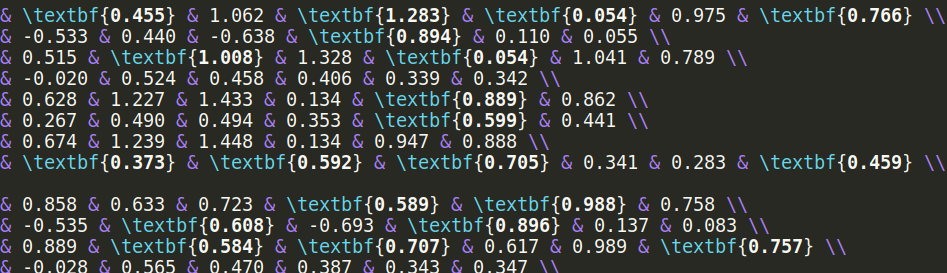
Very easily you can find all those instances by using:
\\textbf{[\d].[\d]*}
(The starting double \ is to scape the \ from \textbf{}). Now, somehow, I need to be able to tell the replace field to replace each instance with the matched contents in [\d].[\d]*. A quick google search finds this post from Overleaf where they explain it should be as easy as doing:
Replace: /([a-z])-([a-z])/
With: /$1$2/
And it really is that easy. But for the life of me, I didn’t know what was I doing wrong, but it was not working. Turns out, I thought the parenthesis were part of a specific example, as that hyphen between both [a-z], but turns out the parenthesis are fundamental to capture a regex group, which is what we’re doing here.
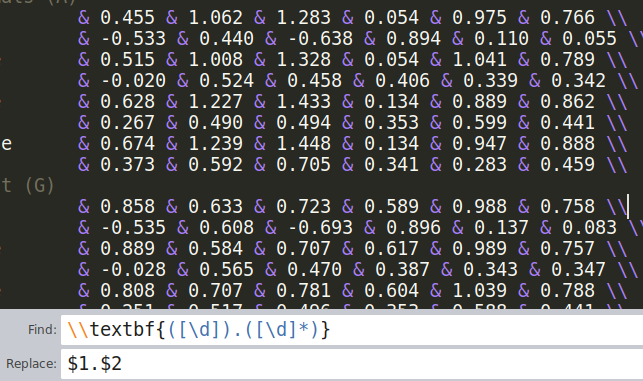
So coming back to our example, the solution is:
Find: \\textbf{([\d]).([\d]*)}
Replace: $1.$2

Javier Selva has a background of computer science and currently specializes in Machine Learning. In particular he is passionate about NLP, CV and self-supervised learning with Transformers.